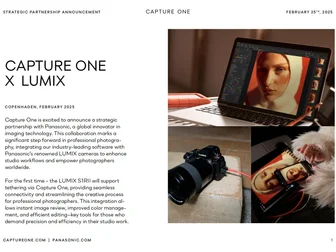
Executive Overview: The Studio Standard for Lumix
In high-end commercial, fashion, product, and architectural photography, **Capture One Pro** is widely recognized as the industry-standard software for studio tethering and raw image conversion. The strategic partnership between **Panasonic Lumix and Capture One** formalized native high-speed tethering, dedicated camera-calibrated ICC color profiles, and wireless remote live-view operation across both the full-frame Lumix S series and Micro Four Thirds Lumix G series.
This comprehensive technical guide outlines the complete setup procedure for tethered shooting, details the advantages of Lumix ProStandard color rendering over traditional raw converters, and provides solutions for common studio connectivity hurdles.
Verified Compatibility Matrix
Camera Model | Connection Type | Supported Studio Features
**Lumix S1 / S1R / S1H** | USB-C 3.1 Gen 1 | High-speed RAW tethering, live view, remote exposure adjustment, focus control.
**Lumix S5 II / S5 IIX** | USB-C 3.2 Gen 2 | Rapid buffer clearance, continuous USB-C Power Delivery, wireless Wi-Fi tethering.
**Lumix G9 II / GH7** | USB-C 3.2 Gen 2 | High-speed burst tethering, handheld high-res RAW ingestion, remote focus peaking.
**Lumix S9** | USB-C 3.2 / Wi-Fi | Wireless image transfer and direct LUT-baked JPEG ingestion.
Step-by-Step Studio Tethering Configuration
To establish an ultra-stable tethered connection between your Panasonic Lumix camera and Capture One Pro, configure the following hardware and software parameters:
``` [ Camera Menu ] -> Setup Menu > USB > USB Mode > Select "PC(Tether)" [ Power Delivery ] -> Enable "USB Power Supply" to prevent battery drain [ Connection Cable ] -> Use high-speed USB-C 3.2 (10Gbps) cable with lock clamp [ Capture One Pro ] -> Preferences > Capture > Verify "Panasonic" is checked [ Launch Session ] -> Create new Session > Capture tab automatically recognizes camera ```
Critical Camera Settings:
1. **USB Mode:** Set explicitly to **PC(Tether)**. Avoid "PC(Storage)" or "PictBridge", which only mount the camera as an external drive rather than a live tethered capture device. 2. **USB Power Supply:** Toggle to **ON**. When connected to a computer supporting USB-PD, your laptop continuously powers the camera, eliminating the need to swap camera batteries during an all-day commercial shoot. 3. **Cable Strain Relief:** Always secure your tether cable with a JerkStopper or camera cage cable clamp. High-resolution raw transfers can be interrupted if the USB-C connector wiggles inside the port.
Why Commercial Photographers Prefer Capture One for Lumix RAW (.RW2)
1. Lumix ProStandard Color Profiles
Capture One includes bespoke **ProStandard ICC profiles** engineered specifically for Lumix sensor color filter arrays: - **Skin Tone Smoothness:** Eliminates the yellow/green tint occasionally rendered by generic raw profiles, delivering luminous, natural skin tones. - **Color Fidelity Under Studio Strobes:** Red, magenta, and saturated corporate brand colors remain true across varying flash power levels.
2. Superior Highlight Recovery
When shooting high-contrast commercial scenes, Capture One’s raw demosaicing algorithm reconstructs blown highlight channels without causing unnatural gray desaturation or harsh chromatic aberration boundaries.
3. Capture One Live Cloud Collaboration
With built-in **Capture One Live**, photographers can generate an encrypted web link for remote art directors, clients, or stylists anywhere in the world. As images are captured in the studio, they appear on client iPads and desktop browsers within 3 seconds, allowing live ratings, color-tagging, and feedback without requiring clients to travel to the studio set.
Troubleshooting Common Tethering Issues
Problem | Root Cause | Verified Resolution
**Camera Not Detected** | USB Mode set incorrectly or sleeping. | Ensure camera is set to **PC(Tether)**. Turn off "Sleep Mode" in camera power settings.
**Connection Drops Periodically** | Cable length exceeds passive USB-C limits (>3m). | Use an **active tether cable** with built-in signal boosters (e.g. TetherPro USB-C).
**Live View Window is Black** | Lens manual focus switch engaged or lens cap on. | Switch lens to AF/MF remote control; verify shutter speed is not set to Bulb mode.
**Capture Delay / Slow Ingestion** | High-resolution 47MP/100MP files bottlenecking. | Set camera to record RAW to card and lightweight JPEG to Capture One, or upgrade to USB 3.2 Gen 2 ports.
Summary & Best Practice Workflow
The native integration between Capture One and Panasonic Lumix provides commercial photographers with a professional, tethered workflow rivaling medium format systems.
By configuring **PC(Tether)**, taking advantage of **USB Power Supply**, and applying **ProStandard color profiles**, studio photographers can leverage the full optical resolving power and dynamic range of Lumix full-frame and Micro Four Thirds cameras on demanding client sets.