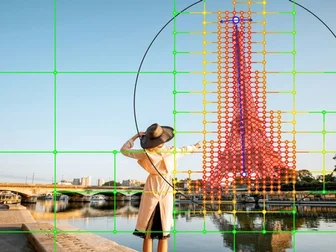
Straightening a building has always cost you the frame. You fix the verticals, and everything that was leaning against them leans the other way — so you crop, and the composition you walked to that corner for quietly disappears. DxO has spent six versions trying to make that trade less painful, and ViewPoint 6, released October 20, attacks it from a direction I did not expect: instead of correcting the whole picture, it corrects the one thing you drew a box around.
That sounds like a small change. It is not.
The mask is the product

The headline feature is AI Masks inside ReShape Fusion, the local-warp tool that arrived back in ViewPoint 5. You draw a rectangle around whatever is wrong, ViewPoint builds a mask that follows the outline of what's inside it, and the correction mesh is shaped to that outline rather than laid across the entire frame as a uniform grid.
That mesh can then be subdivided where the work needs finer control and merged where it doesn't, individual control points can be switched off, and you decide how far the correction bleeds into whatever sits next to it. Jean-Marc Alexia, DxO's VP of product strategy, frames it as photographers having long accepted that straightening geometry costs part of the frame — the masks are meant to make that cost optional rather than mandatory.
DxO is quick to point out the AI is doing less than you might expect. It is there to make the selection precise. The corrections themselves stay manual, and the software invents no pixels and fills nothing in at the edges. Frame dimensions come out the other side unchanged.
Three problems it still solves the old way
Underneath the mask work, the classic ViewPoint tools are unchanged: barrel distortion, converging verticals, and volume deformation — the wide-angle stretching that makes people at the edges of a group look wider than those in the middle. Distortion correction still runs on DxO's Modules, built from laboratory measurement of thousands of camera and lens combinations, which is the part of this software that has quietly been the most valuable for anyone shooting wide.
DxO also pushes back on the idea that geometry is only an architecture concern. Interiors, travel, street, and portrait work all produce frames that need structural adjustment, at any focal length.
RAW arrives, and so does non-destructive editing
The standalone application now opens RAW directly, alongside TIFF and JPEG. Files render in DxO Wide Gamut with DxO's own camera profile, then ViewPoint reads the embedded metadata, pulls the matching Camera-Matching Profile, and applies distortion correction automatically.
Two controls were added before any geometry work begins: exposure compensation from −4 to +4 EV across every format, and white balance — presets plus Temperature and Tint sliders and an eyedropper for RAW, a single slider and the same eyedropper for JPEG and TIFF.
Corrections live in a sidecar file beside the image, and DxO deliberately keeps ViewPoint's sidecars separate from PhotoLab's own so neither application corrupts the other's adjustments. Export is 8-bit or 16-bit TIFF, or JPEG.
ViewPoint 6 runs standalone or as a plug-in for Lightroom Classic, Photoshop, and Capture One, and PhotoLab 10 owners find the tools inside PhotoLab's Geometry palette.
What I'd want to test
$129.99 for a new licence, $84.99 to upgrade from ViewPoint 5, €119.99 and €74.99 respectively in Europe, with a 30-day trial — available now for macOS and Windows.
I haven't run the new masks, so I can't tell you how the automatic selection holds up when the scene is cluttered — and cluttered scenes are exactly where you most want to straighten one thing and leave everything else alone. Based on the workflow description rather than my own testing, the mesh-density controls and the falloff slider are where I'd expect either this to become the default way I correct geometry, or to stay a tool I reach for only when a frame is already nearly right.
Which is worth a trial on that 30 days.